Ever wondered what actually happens when you upload a PDF or any file from a React frontend to a Django backend? Let's break it down step by step using a simple analogy.
The Big Picture
Think of it like submitting a job application:
React is just the messenger. It doesn't keep your PDF. It sends it via a POST request using the HTTP protocol to Django, which securely stores and processes it.
The Complete Flow
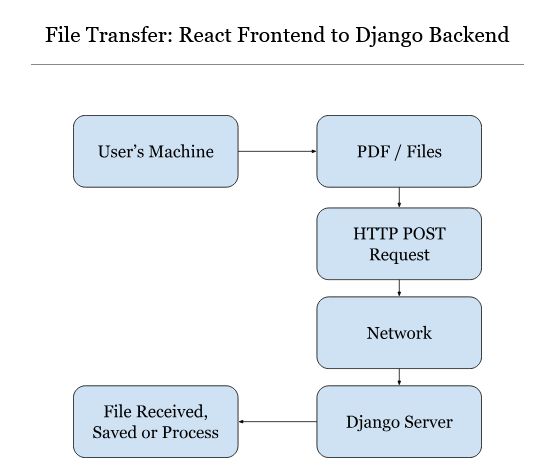
Here's a visual representation of what happens:
File Upload Journey
Your Machine (Browser) → HTTP POST Request → Django Server → File Received → File Saved or Processed
Step-by-Step Breakdown
Step 1: File Selection
User picks a PDF (or any file) from their machine. The file loads into browser memory - it's now accessible to your React code.
Step 2: HTTP Request Preparation
React creates a POST request with multipart/form-data format. This special encoding is required for binary file transmission.
Step 3: Network Transfer
The browser sends the request through multiple network layers - your router, ISP, DNS servers, and finally to the Django server.
Step 4: Server Reception
Django receives the HTTP request containing the file data in the request body.
Step 5: Extraction & Processing
Django extracts the file from the request and either saves it to storage or processes it as needed.
The React Side
In React, you typically use FormData to prepare the file for upload:
React Code Example
const formData = new FormData();
formData.append('file', selectedFile);
fetch('/api/upload/', {
method: 'POST',
body: formData
});
Important: Don't set the Content-Type header manually when using
FormData. The browser will set it automatically with the correct boundary.
The Django Side
Django makes it easy to handle uploaded files:
Django Code Example
def upload_file(request):
if request.method == 'POST':
uploaded_file = request.FILES['file']
# Save or process the file
with open(f'uploads/{uploaded_file.name}', 'wb+') as dest:
for chunk in uploaded_file.chunks():
dest.write(chunk)
Why multipart/form-data?
Regular form submissions use application/x-www-form-urlencoded, which encodes
data as key-value pairs. This works for text but is inefficient for binary files.
multipart/form-data splits the request into multiple parts, each with its
own content type. This allows efficient transmission of both text fields and binary files
in a single request.
Key Takeaways
Remember
- React is just the messenger - it doesn't store files
- Files travel via HTTP POST requests
- Use
multipart/form-datafor file uploads - Django's
request.FILESgives you access to uploaded files - Always validate and sanitize uploaded files on the backend
Conclusion
File uploads might seem magical, but they follow a straightforward process. Understanding this flow helps you debug issues, optimize performance, and build more robust file handling systems.
Have a better way to explain this? Feel free to share your thoughts!